

Quick Summary
A home office setup starts with the chair and desk, since they decide comfort over a full workday, then adds storage, screen placement and lighting. Adjust the chair first, then the desk, then the screen, so each change doesn't undo the last.
- Set your knee angle to roughly 90 to 110 degrees with feet flat on the floor.
- Keep elbows near 90 degrees with shoulders relaxed while typing.
- Place the screen about an arm's length away, with its top at or just below eye level.
- Buy the chair and desk first, then the monitor, keyboard and lighting.
- Recheck seat height and armrests after a full morning, when posture has settled.
Table of Contents
- Start With the Essentials: A Home Office Setup List
- Building an Ergonomic Home Office Setup
- Productivity Gadgets Worth Buying in 2026
- Budget Tiers: What to Buy First, Second and Last
- Small Home Office Ideas for Apartments and Shared Rooms
- Reducing Distractions and Keeping Your Workspace Working
- Choosing Your First Pieces and Ordering Your Home Office Setup
- Frequently Asked Questions
Start With the Essentials: A Home Office Setup List
A productive home office starts with a short list of core pieces, not a pile of gadgets. A common approach is to get the desk and chair right first, then build storage, lighting and input devices around them.
Home office setup is the arrangement of desk, seating, storage, screens and accessories that lets you work comfortably for hours without strain or clutter.
Core Furniture: Desk and Chair
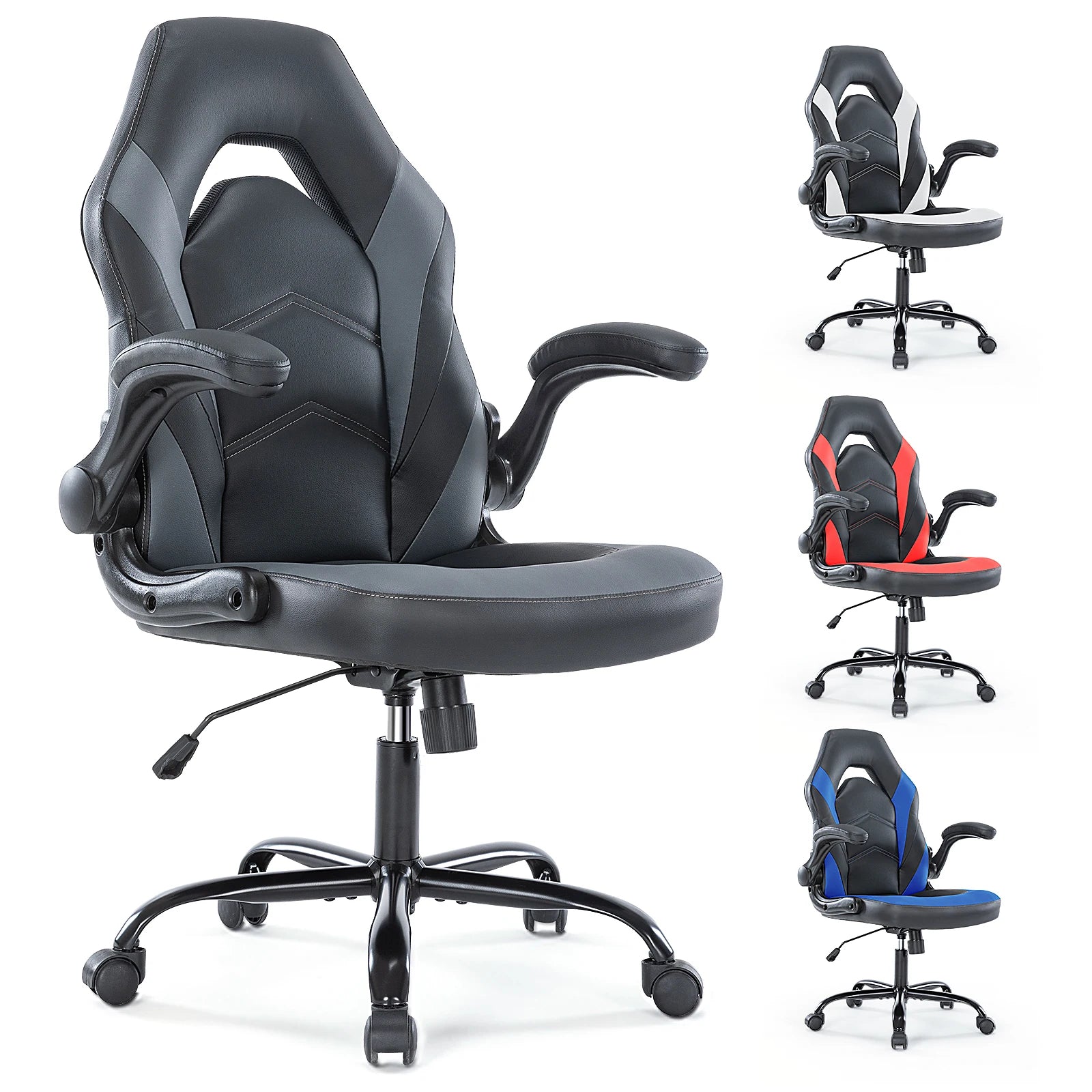
Your chair and desk decide how your body feels by mid-afternoon, so they come first. The PU leather ergonomic adjustable office chair offers adjustable height, flip-up armrests and a swivel base, with a backrest height range from 125mm to 800mm.
Choose a desk deep enough for your monitor plus keyboard, with room for your forearms to rest flat. Measure your available wall before ordering so the desk does not block a door or window.
Storage and Wall Organization
Once the desk is set, clear surface space with wall storage rather than stacking items on the desktop. A wall-mounted shelf keeps books, plants and small devices within reach without taking floor space. The 1Pc Boho 3-tier wooden wall mounted arch shelf organizer is a wall-mounted wooden shelf with three tiers.
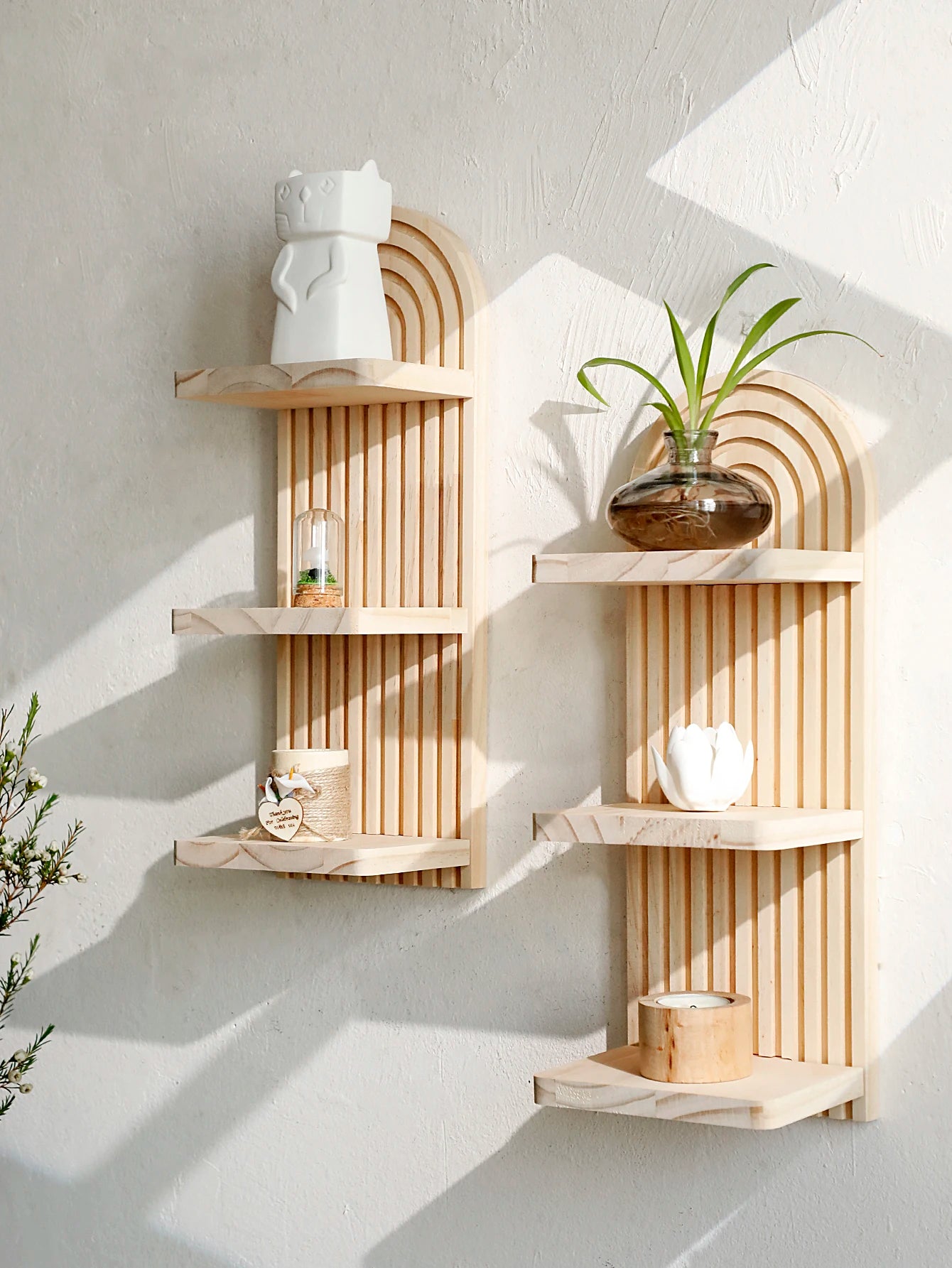
Mount shelves into studs or use rated anchors, and keep heavy items on the lowest tier.
Building an Ergonomic Home Office Setup
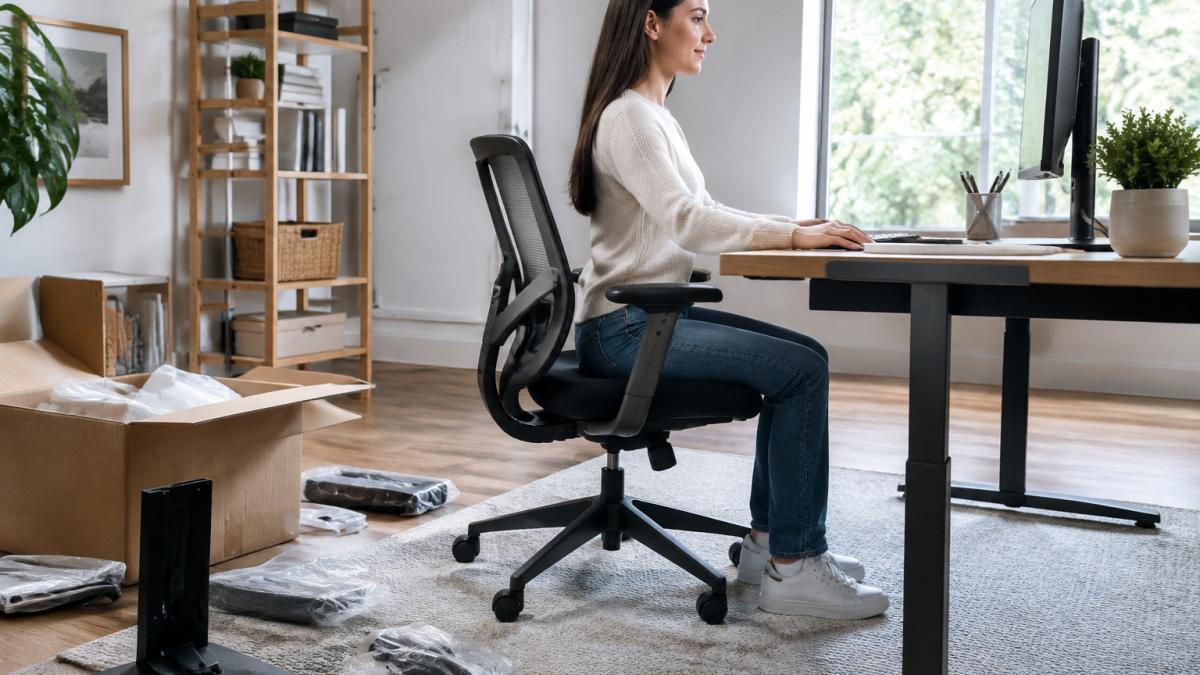
Ergonomics is about matching your equipment to your body, and the useful part is the measurements. A few concrete measurements and a repeatable adjustment order can help you set up a workspace that is easier on the body during remote work. Set the chair first, then the desk, then the screen, then the input devices, changing them in that order avoids re-adjusting everything twice.
Chair Fit: Seat Height, Depth and Armrests
Check seat depth: you should be able to slide two to three fingers behind your knee when your back is against the backrest. If the seat presses into the back of your knees, the pan is too deep or you need a lumbar cushion to push you forward.
Adjust armrests so your shoulders stay relaxed and your elbows bend at about 90 degrees while typing.
Set the backrest recline to roughly 100 to 110 degrees rather than bolt upright, and adjust lumbar support so it sits in the small of your back, not at your shoulder blades.
Watch out: a chair that feels fine in the first hour can still be wrong, recheck seat height and armrest position after a full morning of work, when your posture has settled.
Desk Height and Neutral Posture
With the chair set, adjust the desk so your forearms rest flat and your elbows stay near 90 degrees. If the desk is fixed and too high, a footrest and a keyboard tray bring your hands down; if it is too low, raise the desk on blocks or replace it, because hunching over a low surface is hard to correct with accessories.
Neutral posture means ears over shoulders, shoulders over hips, and wrists straight rather than bent up or down. Keep the keyboard close enough that your upper arms hang near your torso instead of reaching forward.
Screen Height, Viewing Distance and Lighting
Position the top of your screen at or slightly below eye level, and set viewing distance at roughly an arm's length, about 50 to 70 cm for most laptop and monitor sizes.
Place the monitor perpendicular to a window to avoid glare, and add a warm desk lamp for evening work so you are not reading against a bright screen in a dark room.
A Quick Adjustment Checklist
Run through this in order whenever the setup changes: feet flat and knees near hip level; two to three fingers behind the knee; elbows near 90 degrees with shoulders relaxed; screen top at or just below eye level; screen about an arm's length away; wrists straight; and no glare on the screen. Repeat it after any furniture move or new monitor, since a single change, a thicker monitor, a new chair, shifts every measurement above it.
The key measurements for setting up your workspace are summarised below.
| Element | Target | Note |
|---|---|---|
| Knee angle | 90 to 110 degrees | Feet flat on floor |
| Seat depth check | 2 to 3 fingers | Gap behind knee |
| Elbow angle | About 90 degrees | Shoulders relaxed |
| Backrest recline | 100 to 110 degrees | Not bolt upright |
| Viewing distance | 50 to 70 cm | About an arm's length |
| Screen top | At or below eye level | Slightly below preferred |
Productivity Gadgets Worth Buying in 2026
Accessories should solve a specific problem. A few well-chosen items usually beat a long wish list.
- External monitor or monitor stand: raises the screen to eye level and frees desk space.
- Wireless keyboard and mouse: reduces cable clutter and lets you reposition the desk freely.
- Desk lamp with adjustable brightness: reduces eye strain during long sessions.
Buy the monitor and chair first. Accessories add the most value once the core setup is comfortable.
Budget Tiers: What to Buy First, Second and Last
Spending order matters more than total spend. Start with items that affect your body and daily focus.
Tier 1 (buy first): a supportive chair and a stable desk at the correct height.
Tier 2 (buy second): monitor or stand, keyboard, lighting and basic storage.
Tier 3 (buy last): decorative shelves, extra gadgets and specialty audio.
Check current listings on the site before budgeting, since prices and availability can change.
Small Home Office Ideas for Apartments and Shared Rooms
Many people work from a corner of a bedroom or living room, and the hard part is not fitting a desk, it is sharing the room with other people and other uses. A small footprint works if you plan for noise, privacy, and packing the workspace away at the end of the day.
Compact and Multipurpose Furniture
Choose a desk shallow enough to leave a walkway, 50 to 60 cm of depth is usually enough for a monitor and keyboard, and a chair that tucks fully under the surface so the corner reads as furniture, not an office, when you stop working.
Use wall-mounted shelving above the desk rather than a floor-standing bookcase, and keep heavy items on the lowest tier. Mount shelves into studs or use rated anchors, since a loaded shelf pulling out of drywall is a common failure in rented apartments.
Noise, Privacy and Shared-Room Boundaries
If the room is shared, a freestanding screen or a tall shelf can mark the workspace so the rest of the room feels separate at the end of the day.
Set consistent hours and close the laptop or clear the desk afterward. Visual separation helps your brain switch off, and it signals to housemates that the workspace is closed.
Watch out: a folding desk or pack-away setup only works if you actually pack it away, leaving it open defeats the purpose and slowly turns the shared room back into an office.
Power, Cables and Pack-Away Setups
In a shared room, cable clutter is the main thing that makes a corner look like a permanent office. Use a cable management tray under the desk, a single power strip with a switch, and clips to route charging cables along the desk edge.
A laptop-plus-stand setup packs down faster than a desktop with a separate monitor, which is worth the smaller screen if the room has to return to living space every evening.
Reducing Distractions and Keeping Your Workspace Working
Distractions often come from the setup itself: visible clutter, tangled cables, poor lighting and a screen placed where you keep turning away from it. Clear the desk of anything you do not use daily, and place your phone out of reach during focused blocks.
Review the setup every few months. Check whether your chair still fits, whether the screen height still feels right and whether accessories have become unused. Remove what does not help.
Choosing Your First Pieces and Ordering Your Home Office Setup
Start with the chair and desk, then add storage and one accessory at a time. Measure your space, note the dimensions of each piece, and confirm delivery timing before ordering.
Browse the full catalog at Classic Comfort Creations to find furniture, lighting and organizers for your home office. Search by item type to compare options that fit your room and budget.
Frequently Asked Questions
What do you need for a productive home office setup in 2026?
A productive home office in 2026 needs four core items: a desk at a comfortable working height, an ergonomic chair with adjustable height and armrests, a monitor positioned at eye level, and good task lighting. Add a reliable keyboard and mouse, cable management, and a few storage solutions to keep surfaces clear. Start with the chair and desk, since they affect posture and comfort most. Accessories like a headset or desk lamp can come later once the core setup feels right for your daily work.
What is the best desk setup for working from home?
The best desk setup for working from home places the screen directly in front of you, with the top of the monitor at or just below eye level and about an arm's length away. Keep your keyboard and mouse close enough that your elbows stay near your sides and bent at roughly a right angle. A desk surface deep enough for your monitor and keyboard without leaning forward works well. Clear space for paper and notes, and keep the area you use most within easy reach.
How can I make my home office more ergonomic?
Start by adjusting your chair so your feet rest flat on the floor and your knees sit slightly lower than your hips. Set armrests so your shoulders stay relaxed. Raise or lower your monitor so the top of the screen sits at or just below eye level, and place your keyboard so your wrists stay straight. Take short breaks every 30 to 60 minutes to stand and move. If you use a laptop for long sessions, add an external keyboard and raise the screen to reduce neck strain.
Which home office essentials improve productivity?
The essentials that most improve productivity are a comfortable ergonomic chair, a desk with enough surface area, an external monitor, a keyboard and mouse you find comfortable, and good lighting. Reliable internet and a quiet workspace matter too. Storage that keeps paperwork and supplies out of sight reduces time spent searching. Prioritize the items you use for hours each day, since comfort and reduced friction add up over a working week.
How do I set up a home office in a small space?
In a small space, choose a compact desk or a wall-mounted fold-down desk so the workspace can be closed off after hours. Use vertical storage such as wall shelves and a small rolling cart to free up floor and desk space. Pick a monitor arm or stand to clear the desktop. Position the desk away from the main walkway and, if possible, facing a wall to reduce visual distractions. A dedicated corner with a defined boundary helps your brain switch into work mode.
What technology do I need for a work-from-home setup?
Most work-from-home setups need a reliable computer or laptop, an external monitor if you work across multiple documents, a keyboard and mouse, and a headset with a microphone for calls. A stable internet connection and a backup option, such as a mobile hotspot, protect against outages. A surge-protected power strip and a USB hub help if you connect several devices. Choose equipment that works with your existing computer and the software your job requires.
How can I reduce distractions in my home office?
Place your desk so you face away from high-traffic areas and the television. Use noise-reducing headphones or a white noise source if household sounds interrupt you. Set clear working hours and let household members know when you should not be disturbed. Keep only the materials for your current task on the desk, and store everything else out of sight. Turning off nonessential notifications on your devices removes a steady source of interruption during focused work.
